Introduction
Most real estate teams do not lose leads because of bad intent. They lose leads because follow-up is inconsistent.
A lead comes in. Someone means to call. A text goes out late. An email draft sits in a task list. By the time the team follows up, the buyer has already connected with another agent.
That is why real estate lead follow up automation matters.
A strong automation workflow does not replace relationship-building. It handles timing, routing, reminders, and early-stage communication so your team can spend more time in high-value conversations.
This guide shows you how to build a practical automation system that is fast, compliant, and human.
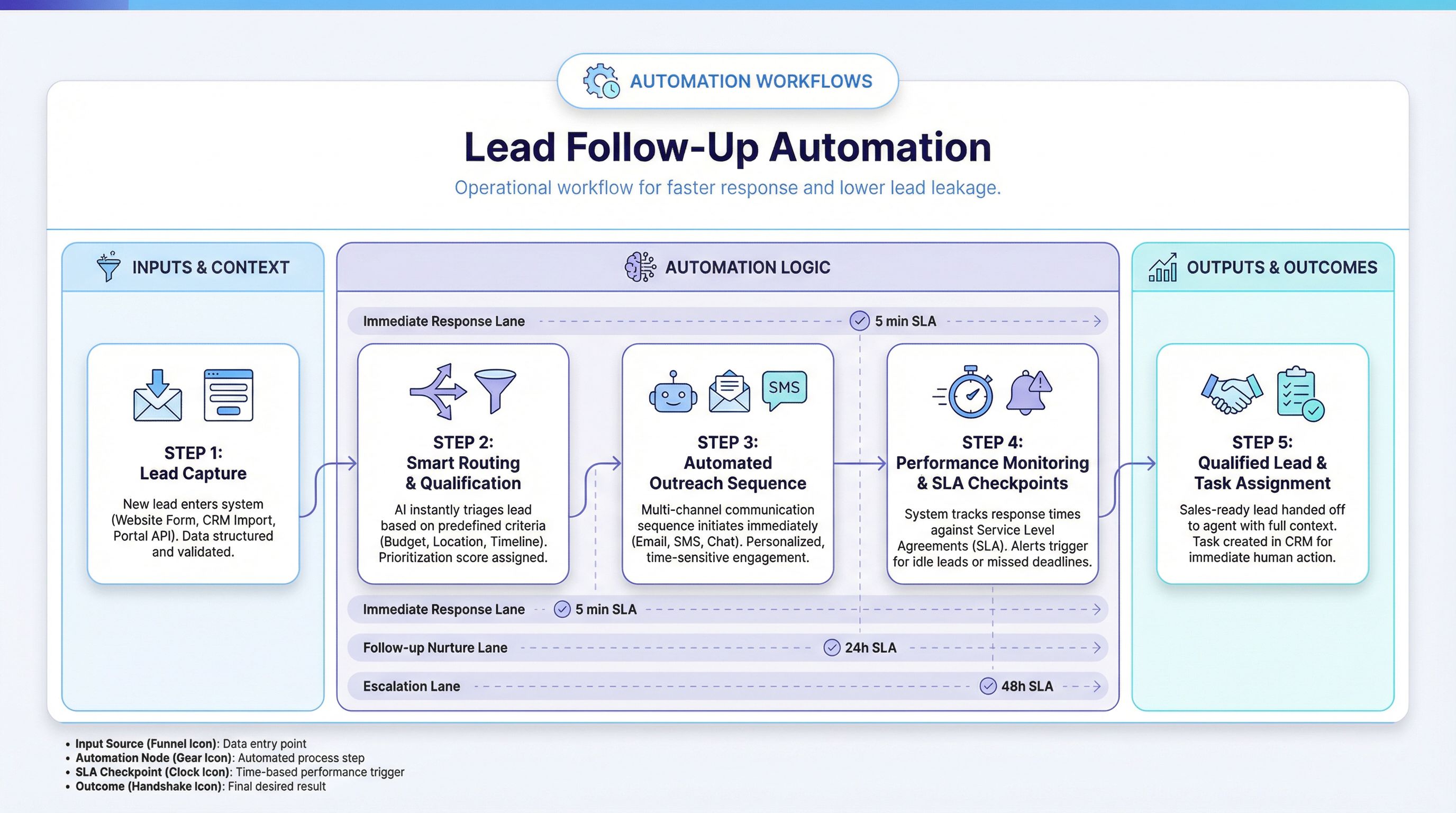
What Real Estate Lead Follow-Up Automation Actually Means
Lead follow-up automation is a connected workflow that does four things well:
- Captures new leads from your sources.
- Triggers immediate first contact across the right channels.
- Qualifies and routes leads to the right agent or sequence.
- Keeps follow-up active until the lead converts, pauses, or exits.
At minimum, your system should automate:
- lead intake and source tagging
- speed-to-lead response
- first-touch messaging
- task and reminder creation
- pipeline stage updates
- nurture sequence enrollment
If any of these steps are manual, follow-up performance depends too much on memory and bandwidth.
Why Teams Adopt Automation Workflows
In most markets, the first useful response wins attention.
Automation helps with:
- Speed: response in minutes instead of hours
- Consistency: same baseline process for every lead
- Visibility: clear pipeline status and ownership
- Scalability: higher lead volume without chaos
- Quality control: standardized scripts with personalization fields
This is especially important for small teams, where one missed handoff can cost an entire month of marketing budget.
The Core Architecture of a Follow-Up System
Think in layers.
1. Capture Layer
Lead sources can include:
- IDX forms
- landing pages
- paid lead portals
- social ads
- open house sign-ins
- referral forms
Each source should pass these required fields:
- name
- contact method (phone/email)
- source
- interest type (buyer/seller/investor)
- location preference
- timeframe hint
2. Routing Layer
After intake, the workflow routes the lead using simple logic:
- by location
- by lead type
- by price range
- by agent availability
- by language
Routing should create owner accountability immediately.
3. Messaging Layer
This layer sends first contact and follow-up messages through:
- SMS
- task-based call reminders
The goal is not message volume. The goal is timely, relevant communication.
4. Qualification Layer
Automation should collect key qualification signals early:
- timeline
- financing readiness
- motivation
- decision-makers
Use short questions and branch logic. Complex forms reduce response rates.
5. Nurture Layer
If leads are not immediate, enroll them in stage-based nurture tracks:
- 0-3 months
- 3-6 months
- 6+ months
Nurture should blend automation and agent touchpoints.
Recommended Workflow Blueprint
Below is a practical starter flow you can implement in most CRM stacks.
Step 1: Trigger on New Lead
When a lead record is created:
- apply source tag
- assign owner using routing rules
- stamp intake timestamp
- set status to
New
Step 2: Send Immediate Acknowledgment
Within 1-3 minutes:
- send SMS acknowledgment if phone exists
- send email acknowledgment if email exists
- create call task for assigned agent
Use a human tone and clear expectations.
Step 3: Qualification Prompt Sequence
If no live conversation occurs, run a short sequence:
- touch 1: quick value-oriented check-in
- touch 2: timeline and area question
- touch 3: low-pressure next step
Stop sequence automatically when:
- lead replies
- lead is marked qualified
- lead opts out
Step 4: Branch by Lead Readiness
Use branching logic:
Hot: immediate call + consultation booking workflowWarm: short nurture + weekly agent check-in taskLong-term: monthly content nurture + quarterly personal check-in
Step 5: Escalation Rules
If no response after defined touches:
- alert assigned agent
- notify team lead
- rotate to secondary follow-up owner if needed
This prevents silent lead decay.
Step 6: Closed-Loop Reporting
Track these events:
- first response time
- response rate by channel
- qualification rate by source
- appointment set rate
- conversion to client
Dashboards should update weekly and monthly.
Example Message Framework (Human, Not Robotic)
First SMS (Immediate)
“Hi [First Name], this is [Agent Name] from [Brand]. Thanks for reaching out about homes in [Area]. Happy to help. Are you currently just exploring, or planning to move in the next few months?”
First Email (Immediate)
Subject: Quick next step for your home search in [Area]
Body should include:
- confirmation of inquiry
- one useful next step
- one short question about timeline or priorities
Follow-Up Text (If No Reply)
“Wanted to make this easy: if helpful, I can send 3 options that fit your goals in [Area]. Want me to send those here?”
Keep messages concise, specific, and permission-based.
Qualification Automation: Keep It Lightweight
A common mistake is over-automating with long forms or too many conditional paths.
Start with four qualification questions:
- Are you buying, selling, or both?
- What timeline feels realistic right now?
- Which areas are top priorities?
- Are you already pre-approved or still exploring financing?
These four signals are enough to route leads into useful next actions.
For deeper qualification, hand off to a live conversation.
CRM Setup Requirements
Your CRM must support:
- workflow triggers on new lead
- conditional branches
- task creation
- stage movement automation
- source attribution
- activity logging
- opt-out compliance handling
Before launching, define a simple pipeline:
NewAttempted ContactEngagedQualifiedConsult ScheduledNurtureClosed
Keep naming clear so reporting stays reliable.
Compliance and Quality Guardrails
Automation is only useful if it remains compliant and brand-safe.
Set guardrails for:
- consent and unsubscribe handling
- frequency caps per channel
- approved message templates
- fair housing-safe language
- business hour sending windows
Also create a review cadence:
- weekly message QA sample
- monthly conversion review by source
- quarterly sequence refresh
Good workflows evolve as market behavior changes.
Common Failure Points (And Fixes)
Failure 1: Slow Response Despite Automation
Cause: delayed trigger or manual approval gates.
Fix: fire first acknowledgment immediately, then branch logic after.
Failure 2: Too Many Touches, Low Reply Rate
Cause: repetitive or generic messaging.
Fix: shorten sequence and increase relevance by source and lead type.
Failure 3: Leads Sit in “Engaged” Forever
Cause: no stage exit rules.
Fix: add inactivity timers and auto-task escalation.
Failure 4: Team Stops Trusting the System
Cause: poor data hygiene and bad routing.
Fix: enforce required fields and monthly routing audits.
30-Day Implementation Plan
Week 1: Process Mapping
- document current follow-up process
- identify delays and drop-off points
- define stage names and ownership
Week 2: Workflow Build
- configure triggers and routing
- draft first-touch templates
- set task automation and escalation
Week 3: Testing and QA
- test each branch with sample leads
- validate message timing and personalization
- confirm opt-out behavior
Week 4: Launch and Optimization
- launch with monitoring dashboard
- review first response metrics daily
- adjust copy and branch rules based on replies
Start simple. Depth can be added after baseline reliability is proven.
Metrics That Matter Most
Track these in order:
- Speed-to-lead (median minutes to first touch)
- First reply rate by source
- Qualification rate by source
- Consultation set rate
- Client conversion rate
These metrics show whether your workflow is producing business outcomes, not just activity.
Advanced Layer: AI-Assisted Personalization
After core automation is stable, add AI where it helps most:
- dynamic message variations by source
- auto-summary of lead conversations
- suggested next best action for agents
- qualification confidence scoring
Do not start here first.
AI improves performance after your workflow logic is already reliable.
FAQ
Is lead follow-up automation only for large teams?
No. Small teams benefit the most because automation protects against missed steps when bandwidth is limited.
How many follow-up touches should we automate?
Start with 3-5 touches in early stage follow-up, then adjust based on reply rates and opt-outs.
Should every lead get the same sequence?
No. At minimum, segment by source, timeline, and buyer/seller intent.
How often should we refresh automation workflows?
Review monthly, optimize quarterly, and fully refresh every 12 months or sooner if market behavior changes.
Final Takeaway
A high-performing real estate automation workflow is not complicated. It is consistent.
If your system captures leads quickly, responds in minutes, routes intelligently, and escalates reliably, your team will convert more opportunities with less operational friction.
If your team wants help designing or rebuilding this workflow end-to-end, schedule a consulting call and we can map your current process into a measurable automation system.