Introduction
Most real estate marketing plans fail in execution, not strategy.
Campaign ideas are strong, but operations break between channels. Email cadence slips, social timing is inconsistent, follow-up handoff is unclear, and reporting arrives too late to improve live performance.
That is why a real estate marketing automation workflow is not optional for teams that want predictable growth.
A strong workflow coordinates campaign triggers, channel sequencing, lead handoff, and performance review in one operating model.
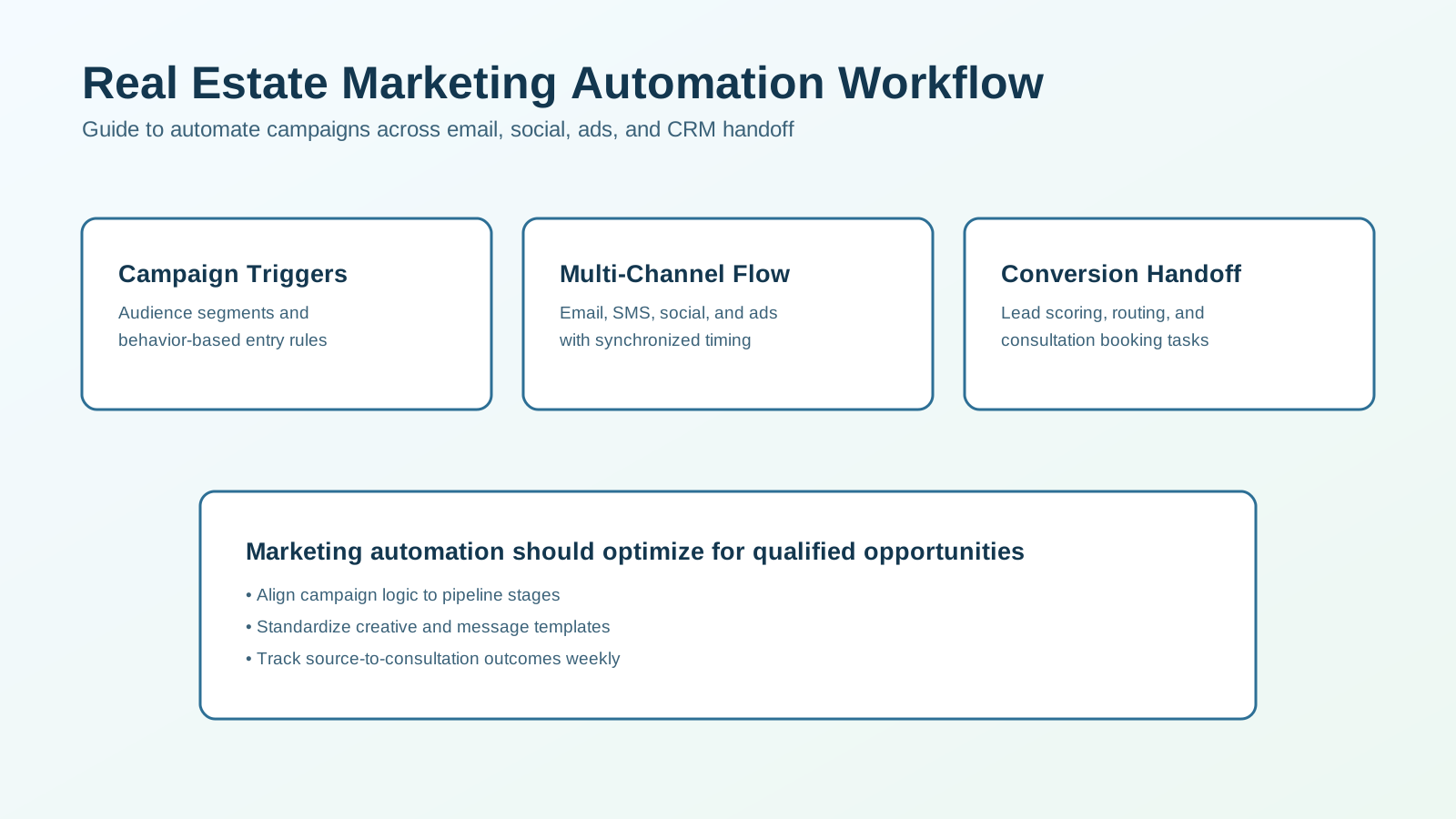
This guide explains how to design and run a practical marketing automation system for real estate teams.
What Marketing Automation Should Do
At minimum, your workflow should:
- segment audiences using useful intent signals,
- launch channel-specific sequences automatically,
- align timing across email, SMS, and social touchpoints,
- route engaged leads into CRM follow-up tasks,
- track campaign performance by qualified outcomes.
If marketing automation only schedules posts or sends newsletters, it is incomplete.
Why Teams Need a Workflow-Based Approach
Common marketing ops problems:
- campaign launch delays,
- inconsistent message timing,
- unclear ownership of follow-up,
- disconnected channel data,
- weak attribution to revenue outcomes.
A workflow approach improves:
- execution speed,
- message consistency,
- team accountability,
- lead quality visibility,
- conversion efficiency.
The objective is operational reliability, not just higher content output.
Core Architecture
Build the system in layers.
1. Audience and Trigger Layer
Define segments and trigger events:
- new inquiry,
- open house attendee,
- listing watcher,
- dormant lead reactivation,
- repeat site engagement.
Triggers should map to distinct campaign goals.
2. Channel Execution Layer
Coordinate touchpoints across:
- email,
- SMS,
- social distribution,
- paid retargeting,
- agent task reminders.
Channel sequencing should be synchronized by timeline and intent.
3. Conversion Handoff Layer
When engagement thresholds are met, create CRM actions:
- assign owner,
- create call/consult task,
- update lifecycle stage,
- log campaign context.
This ensures marketing activity turns into sales action.
4. Nurture Layer
For non-immediate leads, run stage-based nurture:
- short-term active nurture,
- mid-term value cadence,
- long-term reactivation loops.
Nurture should branch by behavior, not fixed dates only.
5. Reporting and Optimization Layer
Track:
- response rate by channel,
- qualification rate by campaign,
- consultation booking rate,
- source-to-client conversion,
- campaign cost efficiency.
Use weekly reviews to tune messaging and timing.
Workflow Diagram
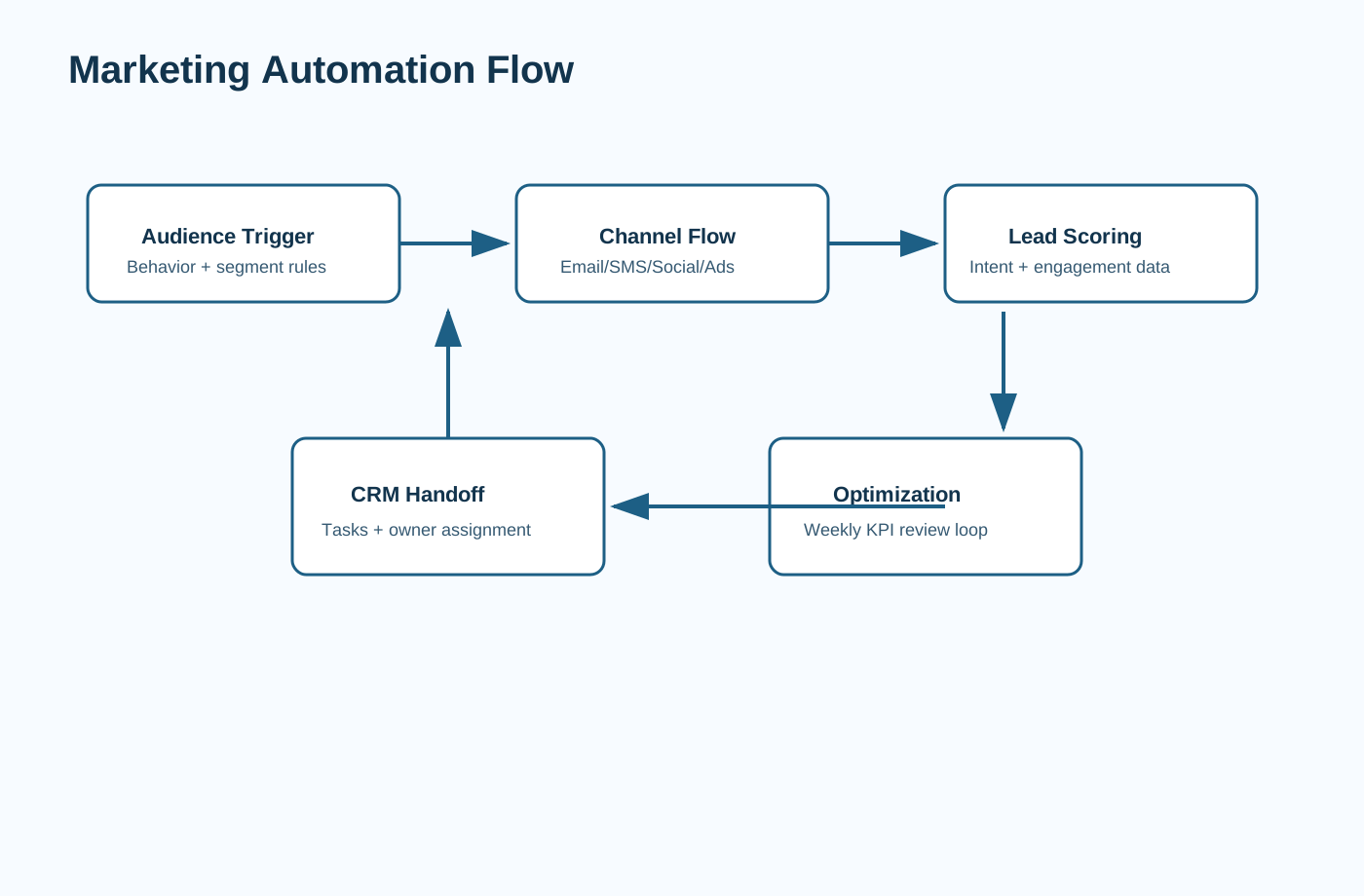
Use this as your baseline orchestration model.
Recommended Workflow Blueprint
Step 1: Define Campaign Entry Rules
For each campaign, set:
- entry criteria,
- exclusion rules,
- stage goals,
- owner responsibilities.
Example: A new buyer inquiry enters an immediate response campaign with 7-day active follow-up.
Step 2: Configure Multi-Channel Sequence
Launch a coordinated sequence:
- Day 0: immediate acknowledgment,
- Day 1: value-based follow-up,
- Day 2-3: intent clarification,
- Day 4+: branch by engagement.
Keep message cadence practical for your market and team bandwidth.
Step 3: Set Engagement Thresholds
Define high-intent signals:
- direct reply,
- repeated link engagement,
- consultation request,
- specific property inquiry.
When thresholds are met, trigger live follow-up tasks.
Step 4: Route to CRM Workflow
On high intent:
- assign lead owner,
- create due-time task,
- attach campaign history,
- update stage.
This reduces context loss between marketing and sales execution.
Step 5: Branch Nurture by Readiness
Not every lead is immediate.
Create paths:
Hot: rapid live follow-up,Warm: short nurture with scheduled check-ins,Long-Term: monthly value content and periodic prompts.
Branching improves relevance and reduces message fatigue.
Step 6: Weekly Optimization Loop
Review and adjust:
- underperforming messages,
- channel sequence timing,
- threshold settings,
- audience definitions.
Small weekly changes compound into stronger quarterly performance.
Messaging Framework by Campaign Stage
First-Touch Message
Goal: acknowledge fast and set expectations.
Include:
- context line,
- one useful next step,
- one clear question.
Mid-Sequence Value Message
Goal: deliver practical value before asking for commitment.
Examples:
- local market shift snapshot,
- buyer/seller checklist,
- neighborhood trend summary.
Conversion Prompt
Goal: move qualified interest to live conversation.
Example:
“Would it be useful to run a quick 10-minute plan call based on your current timeline?”
Keep prompts specific and low-friction.
Channel Strategy Guidance
Best for detailed value and contextual updates.
SMS
Best for quick responses and short decision prompts.
Social Retargeting
Best for reminder visibility and top-of-mind consistency.
CRM Tasks
Best for human handoff and accountability.
Each channel should have one clear role in the workflow.
Team Operating Model
Define clear responsibilities:
- marketing ops owner: trigger design + campaign QA,
- agent owner: high-intent follow-up,
- coordinator/manager: SLA monitoring,
- leadership: weekly KPI review and budget decisions.
When ownership is vague, automation quality declines quickly.
Compliance and Guardrails
Build controls into the workflow:
- channel consent and opt-out handling,
- approved template library,
- prohibited-claim guidance,
- sequence pause on live engagement,
- audit logs for automated sends.
Speed should never bypass compliance.
KPI Dashboard
Execution Metrics
- campaign launch time,
- sequence completion rate,
- SLA compliance.
Quality Metrics
- reply rate by template,
- engagement rate by segment,
- handoff quality.
Outcome Metrics
- qualified lead rate,
- consultation booking rate,
- source-to-client conversion,
- cost per qualified opportunity.
Metrics should drive weekly changes, not monthly retrospectives only.
Implementation Readiness Checklist
Before launch, confirm:
- each campaign has one owner and backup owner,
- stage-specific templates are approved,
- triggers and exclusions are documented,
- channel consent and opt-out logic are tested,
- CRM handoff rules are validated in test records,
- KPI dashboard is available before first live send.
This checklist prevents fragile launches and makes troubleshooting faster.
Common Failure Modes
Failure 1: Too Many Campaigns Too Early
Fix: launch 2-3 core flows first and expand after stable performance.
Failure 2: Generic Message Libraries
Fix: segment by intent and lifecycle stage.
Failure 3: Disconnected CRM Handoff
Fix: enforce trigger-to-task mapping and owner assignment.
Failure 4: No Optimization Cadence
Fix: run weekly channel and template reviews with clear action owners.
30-Day Launch Plan
Week 1: Design
- define segments, triggers, and goals,
- finalize templates and compliance rules,
- map handoff logic to CRM stages.
Week 2: Build
- configure core sequences,
- connect channels,
- set alert and escalation rules.
Week 3: QA
- run test records through each path,
- validate stop conditions,
- train team on ownership workflows.
Week 4: Launch + Tune
- go live with core campaigns,
- monitor KPI dashboard,
- tune timing and messaging.
This phased rollout balances speed and control.
Campaign Architecture Checklist
Before launching automations, confirm each campaign has:
- one primary objective (awareness, engagement, or conversion),
- explicit entry and exit conditions,
- segment-specific templates,
- channel-specific timing windows,
- CRM handoff trigger thresholds,
- assigned owners for campaign QA and follow-up.
Avoid running campaigns that do not have defined conversion intent.
Marketing Automation Scorecard
Use this scorecard weekly to audit workflow quality.
Score each area from 1-5:
- trigger precision,
- sequence relevance by segment,
- channel timing consistency,
- handoff reliability to CRM,
- reporting clarity by stage.
Interpretation:
- 22-25: stable workflow with optimization headroom,
- 16-21: functional but inconsistent in key areas,
- below 16: workflow redesign required.
This turns reviews into concrete operational decisions instead of subjective opinions.
Cross-Channel Governance Model
Automation quality depends on governance as much as tooling.
Define three governance layers:
Editorial Governance
- approved voice and tone framework,
- claim and compliance rules,
- template review cadence.
Operational Governance
- who can change triggers and sequence logic,
- QA checklist before campaign launch,
- rollback plan for failed automations.
Performance Governance
- weekly KPI owner,
- threshold rules for pausing or scaling campaigns,
- documentation of tested changes and outcomes.
Without governance, automation drift causes inconsistent results over time.
Frequently Asked Questions
What is a real estate marketing automation workflow?
It is a connected system for campaign triggers, channel sequencing, lead handoff, and reporting tied to pipeline outcomes.
Which channels should be automated first?
Most teams start with email, SMS, and CRM tasks, then expand into social and retargeting.
How do we avoid robotic automation?
Use segment-based templates, concise messaging, and human handoff at high-intent moments.
Which KPI should we prioritize first?
Start with qualified lead rate and consultation bookings per campaign.
Final Recommendation
Treat marketing automation as an operational engine that connects content, campaigns, and conversion workflows.
Start with clear triggers, synchronized channel sequencing, and strict CRM handoff rules. Then optimize weekly using qualified-outcome metrics.
That approach creates reliable marketing performance without overwhelming your team.
If you want this mapped to your exact channel stack and team model, schedule a consulting call and we can design the workflow architecture with you.